On this page
AI sidecar: letting a tool see the changes
The AI sidecar is a file that lets an AI model you are writing with see the changes in Wymark as you see them. The problem it solves: Wymark saves the .md document to disk as you type (auto save), so an AI tool reading the file does not see the changes Wymark shows you.1
To enable the sidecar, click the sparkles button  in the ribbon. It is off until you turn it on. Changes made before you turned it on are in it too.
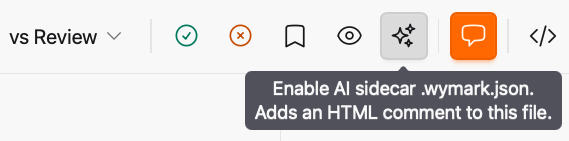
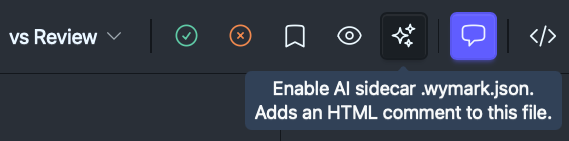
Note
A core design principle for Wymark is that its features do not extend the Markdown format. So the file cannot say which of its text is a pending change. Wymark keeps that in a local database, where no other tool can read it. The sidecar file is a read-only copy of it, written out for a tool to read.2
What you see, and what a tool sees
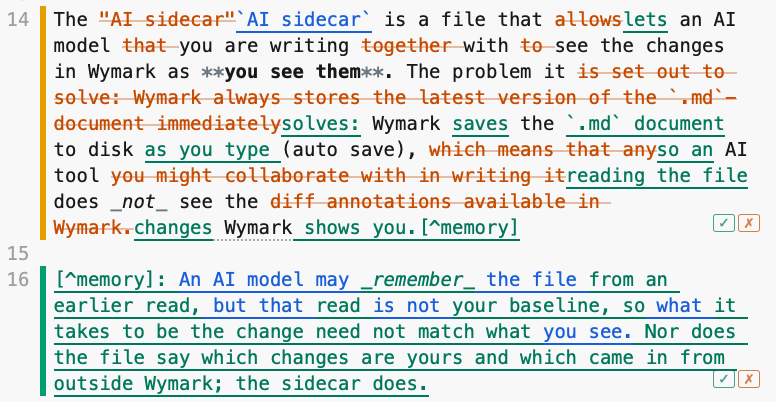
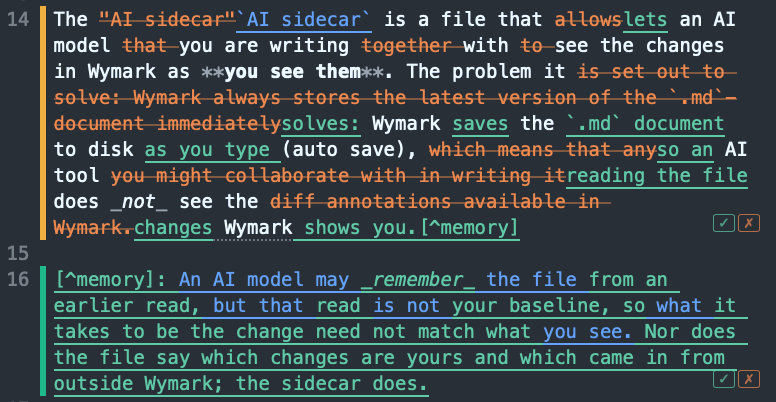
The paragraph above, in Wymark, while its changes are pending. Green came in from outside Wymark; blue is yours.
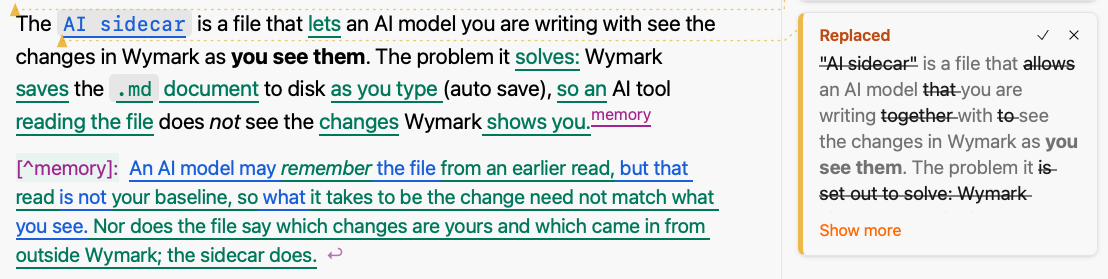
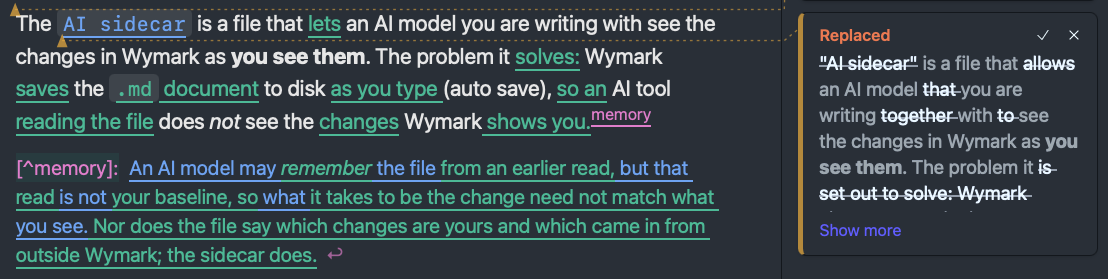
The Source view shows the same changes, with the replaced text struck through.
Note
If the changes look noisy, hide them with the eye button  in the ribbon, or
 ⇧⌘E. They stay pending, and the same button shows them again. Or deal with them now: accept or reject.
A tool that reads the file gets only the text as it is now, with no sign of what changed:
The `AI sidecar` is a file that lets an AI model you are writing with see the changes in Wymark as **you see them**. The problem it solves: Wymark saves the `.md` document to disk as you type (auto save), so an AI tool reading the file does _not_ see the changes Wymark shows you.[^memory]
The sidecar holds the rest. It is a file beside the document, named after it: notes.md gets notes.md.wymark.json. For each pending change it gives the text before and after, and marks each piece as yours (in-app) or from outside Wymark (incoming). A change that holds both is mixed. The entry for the paragraph, shortened:
{
  "id": "h35394",
  "kind": "replace",
  "origin": "mixed",
  "line": 14,
  "before": "The \"AI sidecar\" is a file that allows an AI model that you are writin...",
  "after": "The `AI sidecar` is a file that lets an AI model you are writing with...",
  "segments": [
    {
      "op": "eq",
      "text": "The "
    },
    {
      "op": "del",
      "origin": "in-app",
      "text": "\"AI sidecar\""
    },
    {
      "op": "ins",
      "origin": "in-app",
      "text": "`AI sidecar`"
    },
    {
      "op": "eq",
      "text": " is a file that "
    },
    {
      "op": "del",
      "origin": "incoming",
      "text": "allows"
    },
    {
      "op": "ins",
      "origin": "incoming",
      "text": "lets"
    }
  ]
}
The full entry for the paragraph
{
  "id": "h35394",
  "kind": "replace",
  "origin": "mixed",
  "line": 14,
  "before": "The \"AI sidecar\" is a file that allows an AI model that you are writing together with to see the changes in Wymark as **you see them**. The problem it is set out to solve: Wymark always stores the latest version of the `.md`-document immediately to disk (auto save), which means that any AI tool you might collaborate with in writing it does _not_ see the diff annotations available in Wymark.\n\n",
  "after": "The `AI sidecar` is a file that lets an AI model you are writing with see the changes in Wymark as **you see them**. The problem it solves: Wymark saves the `.md` document to disk as you type (auto save), so an AI tool reading the file does _not_ see the changes Wymark shows you.[^memory]\n\n",
  "prefix": "ll.-->changes<!--wymark-end-->\n\n",
  "suffix": "[^memory]: An AI model may _reme",
  "segments": [
    {
      "op": "eq",
      "text": "The "
    },
    {
      "op": "del",
      "origin": "in-app",
      "text": "\"AI sidecar\""
    },
    {
      "op": "ins",
      "origin": "in-app",
      "text": "`AI sidecar`"
    },
    {
      "op": "eq",
      "text": " is a file that "
    },
    {
      "op": "del",
      "origin": "incoming",
      "text": "allows"
    },
    {
      "op": "ins",
      "origin": "incoming",
      "text": "lets"
    },
    {
      "op": "eq",
      "text": " an AI model "
    },
    {
      "op": "del",
      "origin": "incoming",
      "text": "that "
    },
    {
      "op": "eq",
      "text": "you are writing "
    },
    {
      "op": "del",
      "origin": "incoming",
      "text": "together "
    },
    {
      "op": "eq",
      "text": "with "
    },
    {
      "op": "del",
      "origin": "incoming",
      "text": "to "
    },
    {
      "op": "eq",
      "text": "see the changes in Wymark as **you see them**. The problem it "
    },
    {
      "op": "del",
      "origin": "incoming",
      "text": "is set out to solve: Wymark always stores the latest version of the `.md`-document immediately"
    },
    {
      "op": "ins",
      "origin": "incoming",
      "text": "solves:"
    },
    {
      "op": "ins",
      "text": " Wymark "
    },
    {
      "op": "ins",
      "origin": "incoming",
      "text": "saves"
    },
    {
      "op": "ins",
      "text": " the "
    },
    {
      "op": "ins",
      "origin": "incoming",
      "text": "`.md` document"
    },
    {
      "op": "eq",
      "text": " to disk "
    },
    {
      "op": "ins",
      "origin": "incoming",
      "text": "as you type "
    },
    {
      "op": "eq",
      "text": "(auto save), "
    },
    {
      "op": "del",
      "origin": "incoming",
      "text": "which means that any"
    },
    {
      "op": "ins",
      "origin": "incoming",
      "text": "so an"
    },
    {
      "op": "eq",
      "text": " AI tool "
    },
    {
      "op": "del",
      "origin": "incoming",
      "text": "you might collaborate with in writing it"
    },
    {
      "op": "ins",
      "origin": "incoming",
      "text": "reading the file"
    },
    {
      "op": "eq",
      "text": " does _not_ see the "
    },
    {
      "op": "del",
      "origin": "incoming",
      "text": "diff annotations available in Wymark."
    },
    {
      "op": "ins",
      "origin": "incoming",
      "text": "changes"
    },
    {
      "op": "ins",
      "text": " Wymark"
    },
    {
      "op": "ins",
      "origin": "incoming",
      "text": " shows you.[^memory]"
    },
    {
      "op": "eq",
      "text": "\n\n"
    }
  ],
  "replaced": [
    {
      "origin": "in-app",
      "text": "allows"
    },
    {
      "origin": "in-app",
      "text": "is set out to solve:"
    },
    {
      "origin": "in-app",
      "text": "always stores"
    },
    {
      "origin": "in-app",
      "text": "latest version of the `.md`-document immediately"
    },
    {
      "origin": "in-app",
      "text": "which means that any"
    },
    {
      "origin": "in-app",
      "text": "you might collaborate with in writing it"
    },
    {
      "origin": "in-app",
      "text": "diff annotations available in Wymark."
    },
    {
      "origin": "in-app",
      "text": " ("
    }
  ]
}
The full entry for the footnote
{
"id": "h8707",
"kind": "insert",
"origin": "mixed",
"line": 16,
"before": "",
"after": "[^memory]: An AI model may _remember_ the file from an earlier read, but that read is not your baseline, so what it takes to be the change need not match what you see. Nor does the file say which changes are yours and which came in from outside Wymark; the sidecar does.\n\n",
"prefix": "ges Wymark shows you.[^memory]\n\n",
"suffix": "<br>\n\n<br>\n\n"
}
]
}
The switch
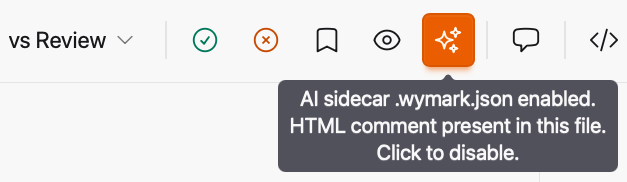
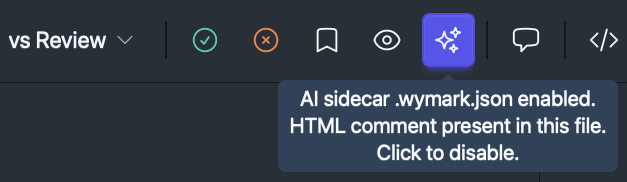
| Scope | One document. Remembered when you close and reopen it, and when you rename it inside Wymark. |
| Turning it on | Lights the button, and opens the sidecar file in a read-only tab beside the document. |
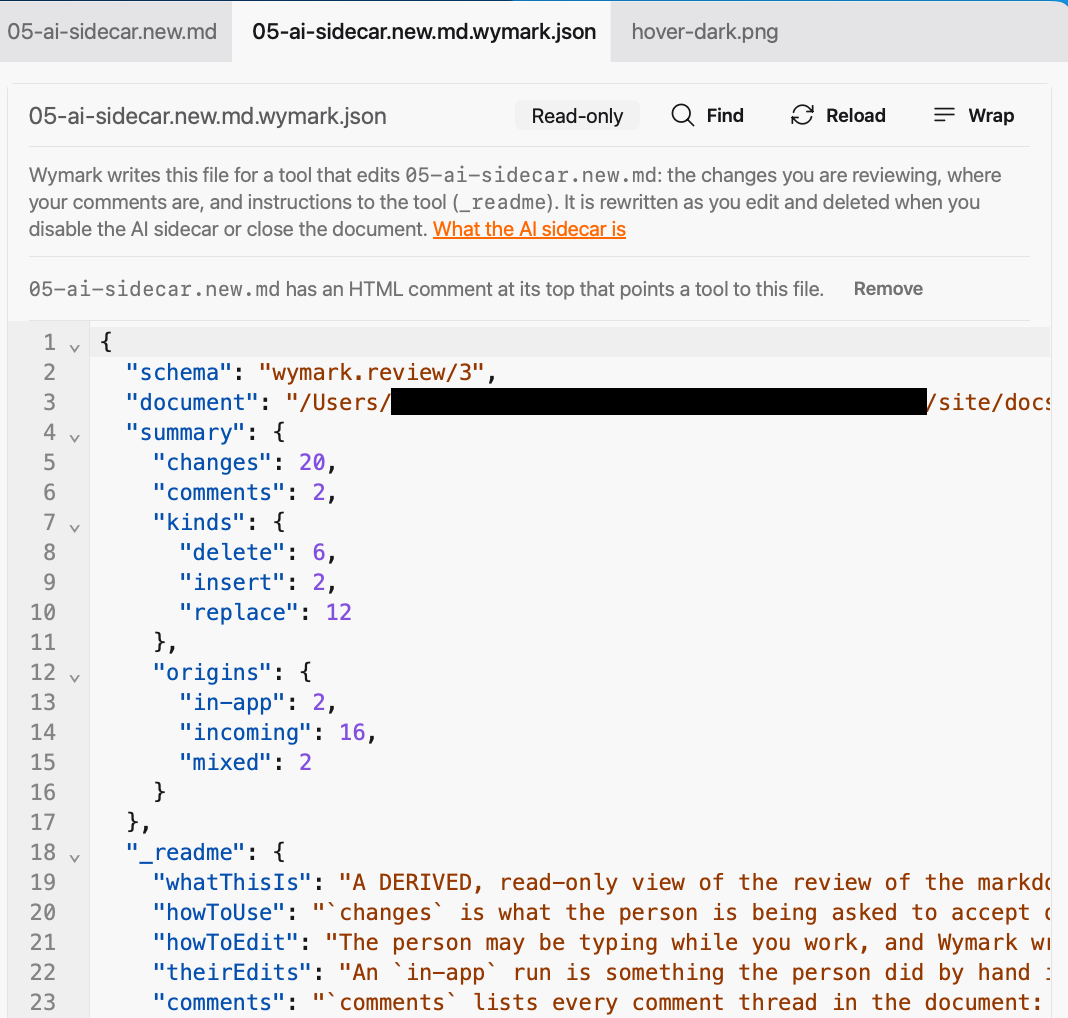
The sidecar file
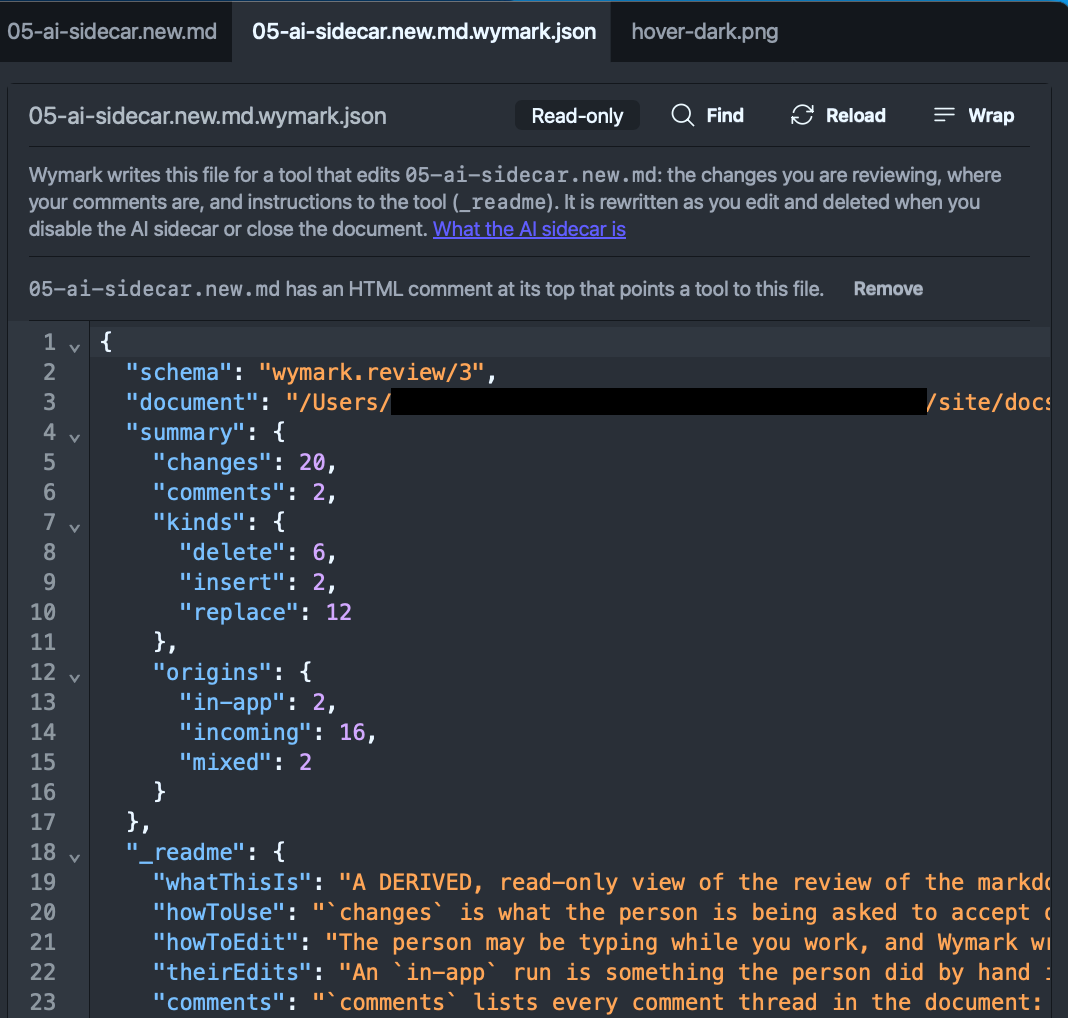
The file opens in a read-only tab beside the document:
| Name | <document>.wymark.json, beside the document. |
| Written | Only while the document is open in Wymark, has been on screen, and has its switch on. Updated on every change. |
| Removed | When you turn the switch off, close the document’s last tab or window, or quit Wymark. After a crash it is left behind, and the next launch deletes it. |
| Read-only | An edit made in it is overwritten. |
It shows:
- the pending changes, as in the example above. They are measured against your baseline, the state you last approved. A change you accept or reject is no longer listed.
- where your comment threads are: line, author, time and number of replies. The words of a comment are only in the document.
- a briefing for the tool in the
_readmesection, the short form of For AI agents
With nothing pending, the file is there with an empty list of changes.
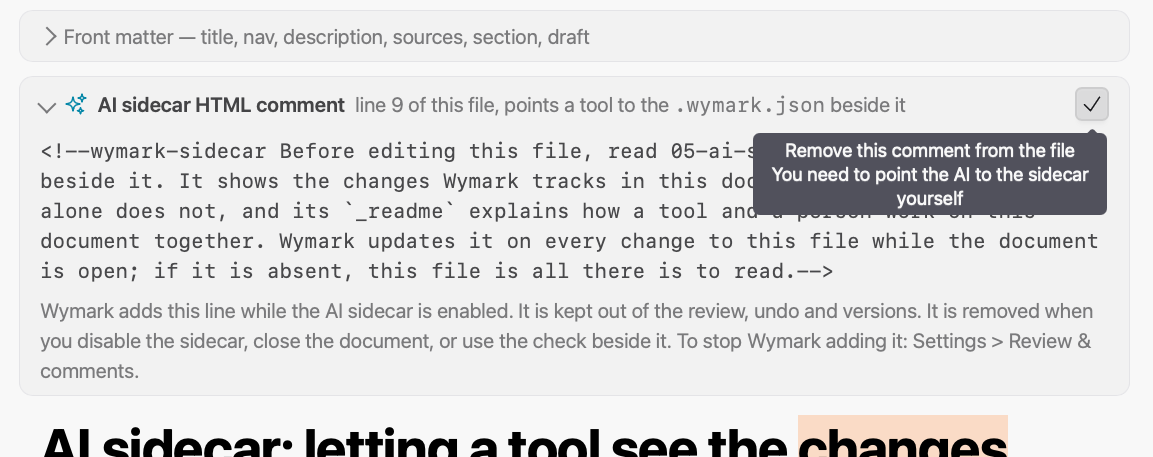
The HTML comment
Wymark adds one HTML comment at the top of the document, after any front matter. It has a single purpose: pointing an AI tool at the sidecar file, which such tools tend to miss unless explicitly informed about it. It is optional; see Settings.
<!--wymark-sidecar Before editing this file, read notes.md.wymark.json beside it. It shows the changes Wymark tracks in this document, which this file alone does not, and its `_readme` explains how a tool and a person work on this document together. Wymark updates it on every change to this file while the document is open; if it is absent, this file is all there is to read.-->
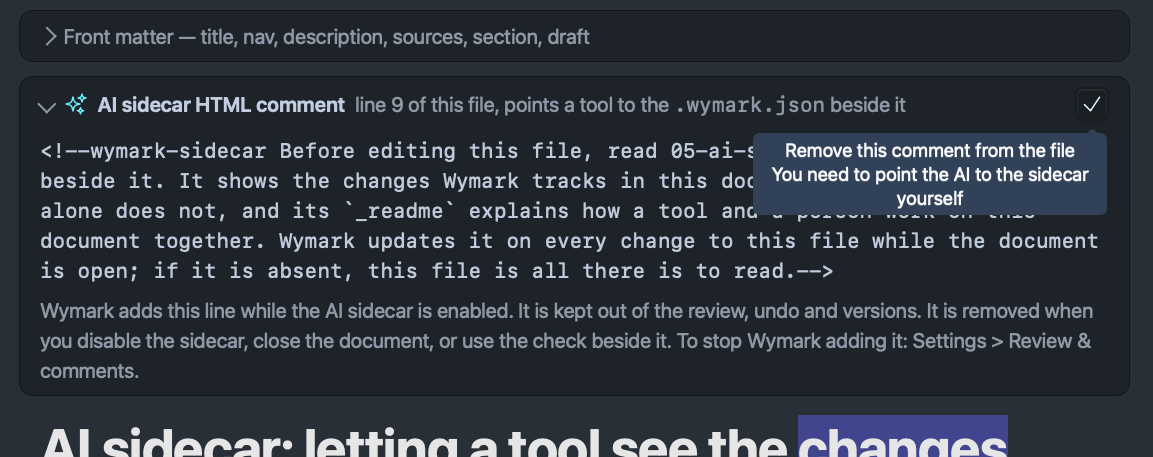
In the Formatted view it is a card above the text:
In the Source view it is the line itself:
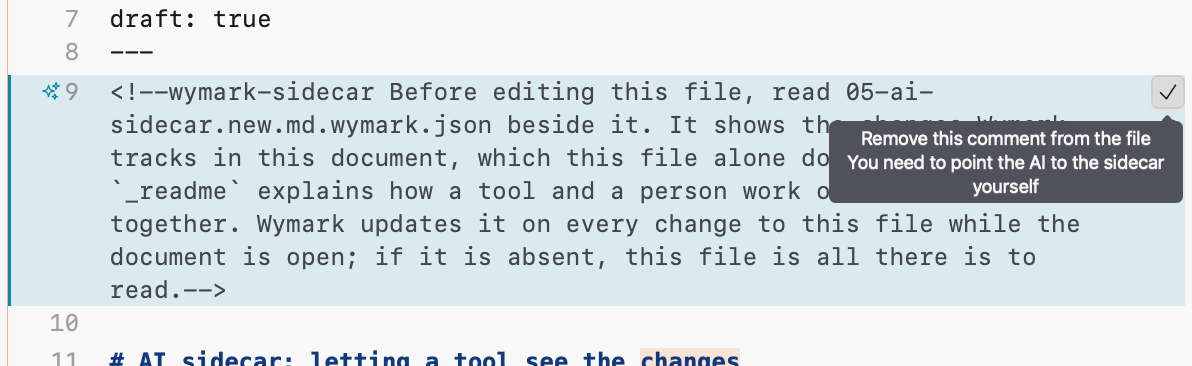
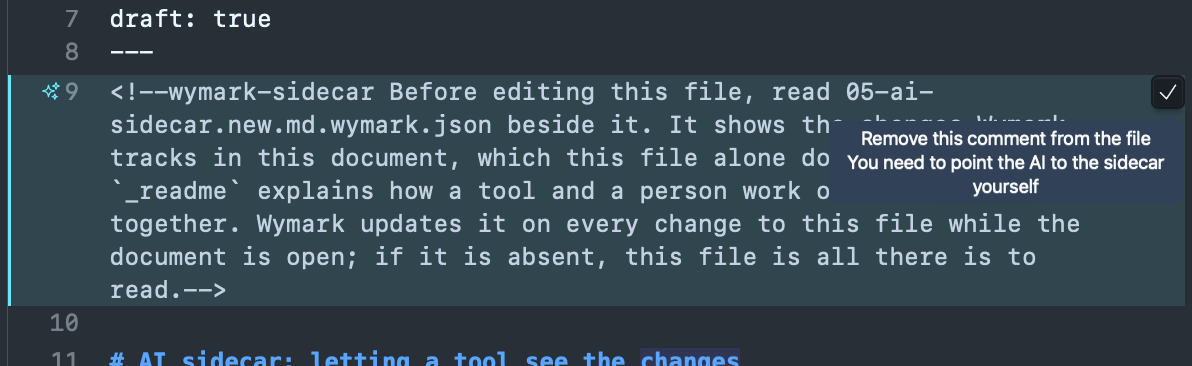
The comment is in the file, but Wymark keeps it apart from what you write:
- It is shown above the text and cannot be edited in either view. The check beside it removes it.
- It is never a change in the review, and undo does not touch it.
- It is not in saved versions, history bundles, or Word and PDF exports.
Show Comment Markersdoes not hide it.
It is removed together with the sidecar file. The document is then byte for byte what it would be without it.
| After a crash | It is left behind, and kept or removed the next time you look at the document, by its switch. |
| Deleted from outside Wymark | It stays out. The button’s tooltip says so, and Add on the sidecar’s tab brings it back. |
| Reworded from outside | The wording stays until the document is closed. |
Its opening <!--wymark-sidecar or closing --> changed |
It is no longer Wymark’s comment, only text in your document. |
| Rename inside Wymark | Rewritten to name the new sidecar file. |
Using git
- An AI tool with a terminal may reach for
git diff. That measures against a commit, not your baseline, and cannot say which text is yours. The sidecar does both, and the HTML comment points the tool to it. - A commit made while the document is open with its switch on includes the comment. Turn the switch off or close the document first.
- Add
*.wymark.jsonto your global excludes. - A
git checkoutorgit stashof an open document takes the comment out.Addon the sidecar’s tab, or the switch off and on, brings it back;git stash popreturns it.
Settings
In Settings > Review & comments, for every document:
| Add the HTML comment when enabling the AI sidecar | Off: only the .wymark.json file is written. Applies to documents you enable from then on. |
| HTML comment text | The comment’s wording. {sidecar} becomes the sidecar’s file name. It cannot contain --> or <!--. A change is written at once to open documents that have the comment. Reset to Wymark's text restores the wording above. |
Wymark sends nothing anywhere when the switch is on; see Privacy. In a new installation the welcome document opens with its sidecar on.
-
An AI model may remember the file from an earlier read, but that read is not Wymark’s baseline, so what it takes to be the change need not match what you see. Nor does the file say which changes are yours and which came in from outside Wymark; the sidecar does. ↩
-
Writing the changes into the document itself, as CriticMarkup does, was considered and rejected: it extends the format. ↩
# AI sidecar: letting a tool see the <!--wymark: {"author":"John Doe","time":"2026-10-07T20:02:03Z"}@@I am a bit unsure on the term used for this, and ideally we pick one and use it consistently. Tracked changes (which is not accurate technically, but what users from Word and Gdocs can relate to), diff (more accurate), "changes" (in line with what app button says `Show/Hide changes`). WDYT?--><!--wymark-reply: {"author":"Claude","time":"2026-10-07T20:30:00Z"}@@"changes". It is the word the app uses (Show/Hide changes, "N changes" on the status chip) and the word every other draft uses. "Tracked changes" I would keep for the Word export, where it is Word's own term. "Diff" I would keep for the How it works pages. Not changed here; say the word and I will.-->changes<!--wymark-end-->
The `AI sidecar` is a file that lets an AI model you are writing with see the changes in Wymark as **you see them**. The problem it solves: Wymark saves the `.md` document to disk as you type (auto save), so an AI tool reading the file does _not_ see the changes Wymark shows you.[^memory]
[^memory]: An AI model may _remember_ the file from an earlier read, but that read is not Wymark's baseline, so what it takes to be the change need not match what you see. Nor does the file say which changes are yours and which came in from outside Wymark; the sidecar does.
To enable the sidecar, click the sparkles button <img src="05-ai-sidecar-assets/sparkles-icon.svg" alt="sparkles icon" width="18"> in the ribbon. It is off until you turn it on. Changes made before you turned it on are in it too.
<figure class="docs-shot">
<img class="docs-shot-light" src="05-ai-sidecar-assets/enable-light.png" width="500"
alt="The ribbon with the pointer over the sparkles button and its tooltip: Enable AI sidecar .wymark.json. Adds an HTML comment to this file.">
<img class="docs-shot-dark" src="05-ai-sidecar-assets/enable-dark.png" width="500"
alt="The same in dark mode.">
</figure>
> [!NOTE]
>
> A core design principle for Wymark is that its features do **not** extend the Markdown format. So the file cannot say which of its text is a pending change. Wymark keeps that in a local database, where no other tool can read it. The [sidecar file](https://en.wikipedia.org/wiki/Sidecar_file) is a read-only copy of it, written out for a tool to read.[^critic]
[^critic]: Writing the changes into the document itself, as [CriticMarkup](https://fletcher.github.io/MultiMarkdown-6/syntax/critic.html#whatiscriticmarkup) does, was considered and rejected: it extends the format.
## What you see, and what a tool sees
The paragraph above, in Wymark, while its changes are pending. Green came in from outside Wymark; blue is yours.
<figure class="docs-shot">
<img class="docs-shot-light" src="05-ai-sidecar-assets/changes-formatted-light.png" width="700"
alt="The opening paragraph and its footnote in the Formatted view. Some words are green and underlined, others blue. A card beside the paragraph reads Replaced and shows the earlier wording struck through, with a check and an x.">
<img class="docs-shot-dark" src="05-ai-sidecar-assets/changes-formatted-dark.png" width="700"
alt="The same in dark mode.">
</figure>
The Source view shows the same changes, with the replaced text struck through.
<figure class="docs-shot">
<img class="docs-shot-light" src="05-ai-sidecar-assets/changes-source-light.png" width="500"
alt="The same paragraph and footnote in the Source view, lines 14 to 16. Replaced words are orange and struck through, new words green or blue, and each change has a check and an x at its end.">
<img class="docs-shot-dark" src="05-ai-sidecar-assets/changes-source-dark.png" width="500"
alt="The same in dark mode.">
</figure>
> [!NOTE]
>
> If the changes look noisy, hide them with the eye button <img src="05-ai-sidecar-assets/eye-icon.svg" alt="eye icon" width="18"> in the ribbon, or `⇧⌘E`. They stay pending, and the same button shows them again. Or deal with them now: accept or reject.
A tool that reads the file gets only the text as it is now, with no sign of what changed:
```markdown
The `AI sidecar` is a file that lets an AI model you are writing with see the changes in Wymark as **you see them**. The problem it solves: Wymark saves the `.md` document to disk as you type (auto save), so an AI tool reading the file does _not_ see the changes Wymark shows you.[^memory]
```
The sidecar holds the rest. It is a file beside the document, named after it: `notes.md` gets `notes.md.wymark.json`. For each pending change it gives the text before and after, and marks each piece as yours (`in-app`) or from outside Wymark (`incoming`). A change that holds both is `mixed`. The entry for the paragraph, shortened:
```json
{
"id": "h35394",
"kind": "replace",
"origin": "mixed",
"line": 14,
"before": "The \"AI sidecar\" is a file that allows an AI model that you are writin...",
"after": "The `AI sidecar` is a file that lets an AI model you are writing with...",
"segments": [
{
"op": "eq",
"text": "The "
},
{
"op": "del",
"origin": "in-app",
"text": "\"AI sidecar\""
},
{
"op": "ins",
"origin": "in-app",
"text": "`AI sidecar`"
},
{
"op": "eq",
"text": " is a file that "
},
{
"op": "del",
"origin": "incoming",
"text": "allows"
},
{
"op": "ins",
"origin": "incoming",
"text": "lets"
}
]
}
```
<details>
<summary>The full entry for the paragraph</summary>
```json
{
"id": "h35394",
"kind": "replace",
"origin": "mixed",
"line": 14,
"before": "The \"AI sidecar\" is a file that allows an AI model that you are writing together with to see the changes in Wymark as **you see them**. The problem it is set out to solve: Wymark always stores the latest version of the `.md`-document immediately to disk (auto save), which means that any AI tool you might collaborate with in writing it does _not_ see the diff annotations available in Wymark.\n\n",
"after": "The `AI sidecar` is a file that lets an AI model you are writing with see the changes in Wymark as **you see them**. The problem it solves: Wymark saves the `.md` document to disk as you type (auto save), so an AI tool reading the file does _not_ see the changes Wymark shows you.[^memory]\n\n",
"prefix": "ll.-->changes<!--wymark-end-->\n\n",
"suffix": "[^memory]: An AI model may _reme",
"segments": [
{
"op": "eq",
"text": "The "
},
{
"op": "del",
"origin": "in-app",
"text": "\"AI sidecar\""
},
{
"op": "ins",
"origin": "in-app",
"text": "`AI sidecar`"
},
{
"op": "eq",
"text": " is a file that "
},
{
"op": "del",
"origin": "incoming",
"text": "allows"
},
{
"op": "ins",
"origin": "incoming",
"text": "lets"
},
{
"op": "eq",
"text": " an AI model "
},
{
"op": "del",
"origin": "incoming",
"text": "that "
},
{
"op": "eq",
"text": "you are writing "
},
{
"op": "del",
"origin": "incoming",
"text": "together "
},
{
"op": "eq",
"text": "with "
},
{
"op": "del",
"origin": "incoming",
"text": "to "
},
{
"op": "eq",
"text": "see the changes in Wymark as **you see them**. The problem it "
},
{
"op": "del",
"origin": "incoming",
"text": "is set out to solve: Wymark always stores the latest version of the `.md`-document immediately"
},
{
"op": "ins",
"origin": "incoming",
"text": "solves:"
},
{
"op": "ins",
"text": " Wymark "
},
{
"op": "ins",
"origin": "incoming",
"text": "saves"
},
{
"op": "ins",
"text": " the "
},
{
"op": "ins",
"origin": "incoming",
"text": "`.md` document"
},
{
"op": "eq",
"text": " to disk "
},
{
"op": "ins",
"origin": "incoming",
"text": "as you type "
},
{
"op": "eq",
"text": "(auto save), "
},
{
"op": "del",
"origin": "incoming",
"text": "which means that any"
},
{
"op": "ins",
"origin": "incoming",
"text": "so an"
},
{
"op": "eq",
"text": " AI tool "
},
{
"op": "del",
"origin": "incoming",
"text": "you might collaborate with in writing it"
},
{
"op": "ins",
"origin": "incoming",
"text": "reading the file"
},
{
"op": "eq",
"text": " does _not_ see the "
},
{
"op": "del",
"origin": "incoming",
"text": "diff annotations available in Wymark."
},
{
"op": "ins",
"origin": "incoming",
"text": "changes"
},
{
"op": "ins",
"text": " Wymark"
},
{
"op": "ins",
"origin": "incoming",
"text": " shows you.[^memory]"
},
{
"op": "eq",
"text": "\n\n"
}
],
"replaced": [
{
"origin": "in-app",
"text": "allows"
},
{
"origin": "in-app",
"text": "is set out to solve:"
},
{
"origin": "in-app",
"text": "always stores"
},
{
"origin": "in-app",
"text": "latest version of the `.md`-document immediately"
},
{
"origin": "in-app",
"text": "which means that any"
},
{
"origin": "in-app",
"text": "you might collaborate with in writing it"
},
{
"origin": "in-app",
"text": "diff annotations available in Wymark."
},
{
"origin": "in-app",
"text": " ("
}
]
}
```
</details>
<details>
<summary>The full entry for the footnote</summary>
```json
{
"id": "h8707",
"kind": "insert",
"origin": "mixed",
"line": 16,
"before": "",
"after": "[^memory]: An AI model may _remember_ the file from an earlier read, but that read is not your baseline, so what it takes to be the change need not match what you see. Nor does the file say which changes are yours and which came in from outside Wymark; the sidecar does.\n\n",
"prefix": "ges Wymark shows you.[^memory]\n\n",
"suffix": "<br>\n\n<br>\n\n"
}
]
}
```
</details>
## The switch
<figure class="docs-shot">
<img class="docs-shot-light" src="05-ai-sidecar-assets/enabled-light.png" width="500"
alt="The ribbon with the sparkles button lit and its tooltip: AI sidecar .wymark.json enabled. HTML comment present in this file. Click to disable.">
<img class="docs-shot-dark" src="05-ai-sidecar-assets/enabled-dark.png" width="500"
alt="The same in dark mode.">
</figure>
| | |
| --- | --- |
| **Scope** | One document. Remembered when you close and reopen it, and when you rename it inside Wymark. |
| **Turning it on** | Lights the button, and opens the sidecar file in a read-only tab beside the document. |
## The sidecar file
The file opens in a read-only tab beside the document:
<figure class="docs-shot">
<img class="docs-shot-light" src="05-ai-sidecar-assets/sidecar-tab-light.png" width="534"
alt="The sidecar file open in its own tab, marked Read-only, with Find, Reload and Wrap. A line above the JSON says what the file is for and when it is deleted, and another says the document has an HTML comment pointing to it, with a Remove button. The JSON begins with schema, document, a summary counting changes and comments, and the _readme.">
<img class="docs-shot-dark" src="05-ai-sidecar-assets/sidecar-tab-dark.png" width="534"
alt="The same in dark mode.">
</figure>
| | |
| --- | --- |
| **Name** | `<document>.wymark.json`, beside the document. |
| **Written** | Only while the document is open in Wymark, has been on screen, and has its switch on. Updated on every change. |
| **Removed** | When you turn the switch off, close the document's last tab or window, or quit Wymark. After a crash it is left behind, and the next launch deletes it. |
| **Read-only** | An edit made in it is overwritten. |
It shows:
- the pending changes, as in the example above. They are measured against your [baseline](/docs/concepts/review), the state you last approved. A change you accept or reject is no longer listed.
- where your comment threads are: line, author, time and number of replies. The words of a comment are only in the document.
- a briefing for the tool in the `_readme` section, the short form of [For AI agents](/docs/agents)
With nothing pending, the file is there with an empty list of changes.
## The HTML comment
Wymark adds one HTML comment at the top of the document, after any front matter. It has a single purpose: pointing an AI tool at the sidecar file, which such tools tend to miss unless explicitly informed about it. It is optional; see [Settings](#settings).
```html
<!--wymark-sidecar Before editing this file, read notes.md.wymark.json beside it. It shows the changes Wymark tracks in this document, which this file alone does not, and its `_readme` explains how a tool and a person work on this document together. Wymark updates it on every change to this file while the document is open; if it is absent, this file is all there is to read.-->
```
In the Formatted view it is a card above the text:
<figure class="docs-shot">
<img class="docs-shot-light" src="05-ai-sidecar-assets/comment-formatted-light.png" width="576"
alt="A card above the document's title, headed AI sidecar HTML comment, line 9 of this file, points a tool to the .wymark.json beside it. It shows the comment's text, a line on when Wymark adds and removes it, and a check at its right edge with the tooltip: Remove this comment from the file. You need to point the AI to the sidecar yourself.">
<img class="docs-shot-dark" src="05-ai-sidecar-assets/comment-formatted-dark.png" width="576"
alt="The same in dark mode.">
</figure>
In the Source view it is the line itself:
<figure class="docs-shot">
<img class="docs-shot-light" src="05-ai-sidecar-assets/comment-source-light.png" width="596"
alt="Line 9 of the file in the Source view, directly after the front matter: the whole HTML comment on a tinted background, with a sparkles icon beside the line number and a check at the right edge showing the same tooltip.">
<img class="docs-shot-dark" src="05-ai-sidecar-assets/comment-source-dark.png" width="596"
alt="The same in dark mode.">
</figure>
The comment is in the file, but Wymark keeps it apart from what you write:
- It is shown above the text and cannot be edited in either view. The check beside it removes it.
- It is never a change in the review, and undo does not touch it.
- It is not in saved versions, history bundles, or Word and PDF exports.
- `Show Comment Markers` does not hide it.
It is removed together with the sidecar file. The document is then byte for byte what it would be without it.
| | |
| --- | --- |
| **After a crash** | It is left behind, and kept or removed the next time you look at the document, by its switch. |
| **Deleted from outside Wymark** | It stays out. The button's tooltip says so, and `Add` on the sidecar's tab brings it back. |
| **Reworded from outside** | The wording stays until the document is closed. |
| **Its opening `<!--wymark-sidecar` or closing `-->` changed** | It is no longer Wymark's comment, only text in your document. |
| **Rename inside Wymark** | Rewritten to name the new sidecar file. |
:::persona git
- An AI tool with a terminal may reach for `git diff`. That measures against a commit, not your baseline, and cannot say which text is yours. The sidecar does both, and the HTML comment points the tool to it.
- A commit made while the document is open with its switch on includes the comment. Turn the switch off or close the document first.
- Add `*.wymark.json` to your global excludes.
- A `git checkout` or `git stash` of an open document takes the comment out. `Add` on the sidecar's tab, or the switch off and on, brings it back; `git stash pop` returns it.
:::
## Settings
In Settings > Review & comments, for every document:
| | |
| --- | --- |
| **Add the HTML comment when enabling the AI sidecar** | Off: only the `.wymark.json` file is written. Applies to documents you enable from then on. |
| **HTML comment text** | The comment's wording. `{sidecar}` becomes the sidecar's file name. It cannot contain `-->` or `<!--`. A change is written at once to open documents that have the comment. `Reset to Wymark's text` restores the wording above. |
Wymark sends nothing anywhere when the switch is on; see [Privacy](/docs/reference/privacy). In a new installation the welcome document opens with its sidecar on.